
Gift wrap and messages for Shopify Plus, checkout included
Shoppers look for gift wrap and a message on the product page, in the cart, and at checkout. Offer them in all three, styled by your theme and checkout branding.










Customers make it a gift inside checkout
Shopify opens checkout to apps on Shopify Plus, so customers who decide late still make it a gift there. The checkout Gift Block is styled by the store's checkout branding.
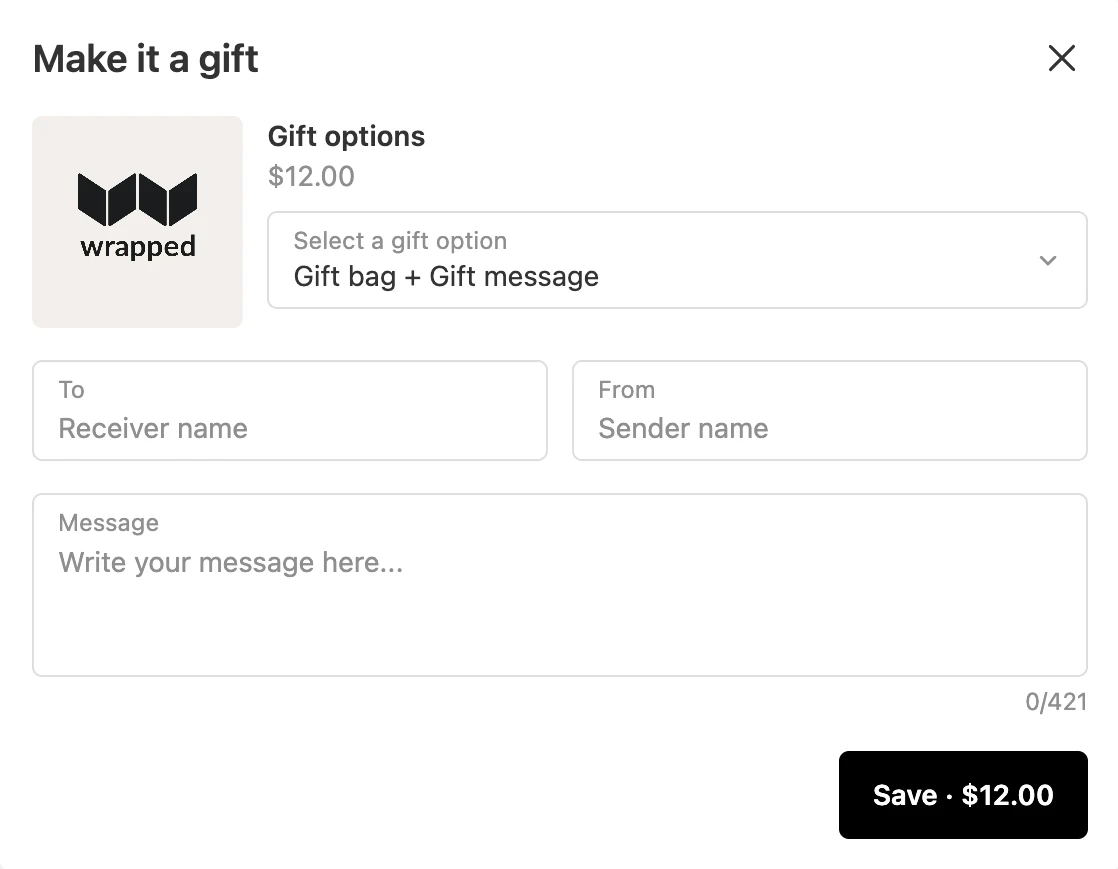
- Gifting for Products. Customers add a gift to any item, right under its line.
- Gifting for Orders. Customers wrap the whole order as one gift, with one note and one fee.
- Required fields and limits. Make To, From, or the message required, cap the message length, and turn emoji off for packing slips.
- On the order. Every gift detail lands on the order, with a summary in the order note and the 🎁 Wrapped tag.
Gifting for retail customers, in the markets that sell it
The store team sets every rule in the app. Developers get stable handles on every Gift Block, and nothing that has to live in the theme code.
- Retail and B2B. One switch hides gifting from B2B customers, and retail customers keep it.
- Markets. Gifting hides where the gift product is not available in the customer's market.
- Products, collections, and tags. Include or exclude any of them for each gift option.
- Delivery methods. At checkout, offer gifting on shipping only, store pickup only, or any delivery method.
- Stable handles. Every Gift Block has a UUID, an HTML selector, and a JavaScript event for custom and headless themes.
- Theme code untouched. Nothing has to go into it, Gift Blocks stay in place through theme updates, and they work in the theme's drawer and the most popular cart drawer apps on Shopify.
Build gifting into your next launch
Your team gets gifting ready before launch day, then runs it from the Shopify admin.
- You set up gifting on a staging theme and preview it before it goes live
- You test or schedule a new theme with Shopify Rollouts, and gifting comes with it
- You reward bigger carts with free gifting that stacks with your other discounts
- You sell gifting in every language your store publishes, and edit any translation
From install to the first gift order
- 1Install from the Shopify App Store7-day trial, plenty of time to set up and explore
- 2Publish a gift optionConnect the gift product and set its pricing rule
- 3Style it in the Gifting editorStart from a preset, then match the theme's colours and type
- 4Turn on the app embedFlip one switch in the theme editor, then add the checkout Gift Block in the checkout editor
Questions Shopify Plus teams ask first
Does the Gift Block run inside Shopify Plus checkout?
Yes. Shopify opens checkout to apps on Shopify Plus, and the checkout Gift Block sits there, styled by the store's checkout branding, under each item with Gifting for Products or once for the order with Gifting for Orders. The product page, cart drawer, and cart page Gift Blocks work the same as on any Shopify store.
Is there a limit on gift sales?
The plan you pick sets it. See pricing.
Can we keep gifting away from B2B customers?
Yes. One switch hides gifting from B2B customers, and another hides it in markets where the gift product is not available. Display rules also include or exclude products, collections, and tags.
How do our developers work with Gift Blocks on a custom or headless theme?
Each Gift Block has a UUID, an HTML selector, and a JavaScript event to build on. Nothing has to go into the theme code, and a theme update leaves the blocks in place.
Who answers when our team needs help?
Bowie gives instant answers, any time, and a person steps in when it takes one.
Can we set it up before Q4 without changing the live store?
Yes. Set up and preview on a staging theme before it goes live. Nothing in the Gifting editor changes the store until you save.
How do we get gifting ready for Black Friday and Cyber Monday?
Publish your gift options and turn on Gift Blocks before the rush, on the storefront and at checkout. See the best Shopify gifting app for Black Friday and Cyber Monday.
Gifting across the whole journey, checkout included
Install on your Shopify Plus store and preview every Gift Block, checkout included, before customers see it.
We've been using this app for a couple of weeks now and it's been working great. Adam was extremely helpful and accommodating with our requirements.